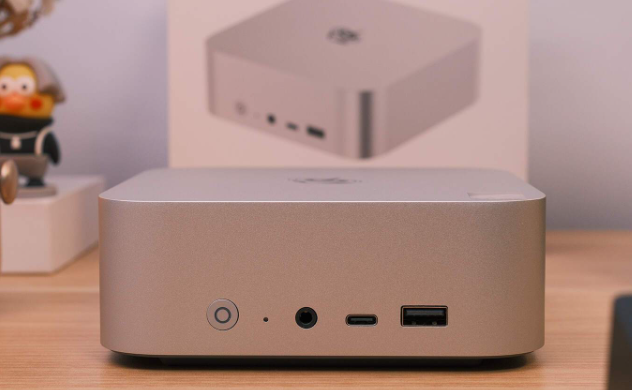
At around CNY 2,299 (barebones) or CNY 4,599 (32GB+1TB), I think the SER9 MAX is worth it for photographers/designers and light video editors who want a compact PC with built‑in 10GbE for a NAS workflow, but it’s not for people who need desktop‑class GPU performance or who want a purchase decision backed by full power-draw and long-term support data (not tested).

Pros / Cons at a glance
Pros
Built-in 10GbE for NAS workflows
Quiet even under sustained load
Strong Photoshop/Lightroom results
Easy upgrades; dust filter included
Cons
AAA gaming still needs compromises
Power consumption not tested
Warranty/support terms not tested
Key info extracted
Category | SER9 MAX (from your data) | Why it matters |
|---|---|---|
CPU | AMD Ryzen 7 “H 255”, 8C/16T, 3.8–4.9GHz, 16MB L3 | Enough CPU for photo work and light editing |
iGPU | Radeon 780M (12 CUs @ 2600MHz) | Playable 1080p gaming and GPU-accelerated apps (within limits) |
Memory | DDR5‑5600 32GB (2×16GB) | Comfortable for Lightroom/PS multitasking |
Size | 135 × 135 × 44.7 mm | Small enough for tight desks/rentals |
Ethernet | 10GbE (WHSM24301G2525 controller) | The big differentiator for NAS-based editing |
Wi‑Fi | Intel AX200 (Wi‑Fi 6) | Solid mainstream wireless; 6E not indicated here |
SSD (stock) | YMTC PC41Q PCIe 4.0×4 1TB (QLC) | Fast everyday work; QLC has tradeoffs (see below) |
Modes | Balanced 54W CPU / Performance 65W CPU | Lets you choose noise/thermals vs speed |
Price | Barebones ~2299; 32GB+1TB ~4599 (CNY) | Helps frame value vs DIY parts |
Design & build (only what’s evidenced)
My take (subjective): The SER9 MAX is the kind of mini PC that makes sense on a small desk: metal CNC body with a sandblasted finish that resists fingerprints, and a plastic bottom cover that’s clearly there to help wireless signal.
Objective details provided:
135 × 135 × 44.7 mm
Metal CNC + matte finish; plastic bottom cover for RF
Connectivity & compatibility (ports + why they matter)
What makes this machine “workflow-ready” is that it doesn’t just have fast ports—it has the right mix for creators who work off external storage or a NAS.
Ports
Location | Ports | Why I care |
|---|---|---|
Front | CLR CMOS, 3.5mm audio, USB‑C 10Gbps, USB‑A 10Gbps | Fast access for SSDs/card readers; CMOS reset is enthusiast-friendly |
Rear | USB4 40Gbps, HDMI (4K 240Hz), 3.5mm audio, 2× USB 2.0, DP2.1 (4K 240Hz), USB‑A 10Gbps, 10GbE LAN | USB4 for docks/fast storage; 10GbE for NAS editing |
Performance & experience (benchmarked + what it means)
1) Creator productivity (objective benchmarks)
You used PugetBench and PCMark 10, which is exactly what I want to see for “ordinary users + light creators” because it maps better to real apps than synthetic CPU-only scores.
Benchmark | Score | What it means in practice |
|---|---|---|
PugetBench Photoshop | 8183 | Plenty for serious photo editing and layered PSD work |
PugetBench Lightroom | 5625 | Good for batch processing and catalog workflows |
PugetBench Premiere Pro | 3206 | Usable for light editing/color; not top-tier vs strong desktops |
PCMark 10 | 6952 | Strong general productivity |
PCMark 10 Express | 6144 | Snappy everyday experience |
PCMark 10 Extended | 6953 | Solid mixed workloads |
My interpretation: This is the first time in your set of mini-PC writeups where the numbers and the intended workflow match cleanly: PS/LR are clearly comfortable, and Premiere is “good enough” if you stay realistic about formats, effects, and timelines.
2) 10GbE NAS editing workflow
you didn’t just say “it has 10GbE,” you showed it can actually saturate the link both directions.
10GbE file transfer (objective)
Negotiated link shows 10GbE
Transfers between NAS SSD pool and SER9 MAX “fill the 10GbE” both directions
Timeline responsiveness
With project files stored on the NAS SSD pool
playback had no stutter
scrubbing the timeline played immediately without waiting
That’s the point of 10GbE: not raw benchmark bragging, but making network storage feel local enough for daily work.
3) Thermals & noise (objective measurements)
30-minute stress tests in 15°C room temperature with two performance modes.
Sustained load results
Mode | CPU power | CPU temp | Memory temp | Noise (near) | Noise (at seating position) |
|---|---|---|---|---|---|
Balanced | 54W | 68°C | ~51°C | 42 dB | 35.1 dB |
Performance | 65W | 80°C | ~52°C | 45 dB | 36.1 dB |
Ambient noise: 34.4 dB
My takeaway: At a normal seating distance, noise is barely above ambient even under full load. That’s a real, practical win for small rooms and shared spaces.
I also captured a thermal image of the exhaust fin area at 56.8°C, supporting the idea that the cooler is doing meaningful work.
Not tested: long-term dust buildup impact beyond the included dust filter, and noise character (pitch/whine).
Gaming performance (objective FPS, with realistic framing)
I measured several games at 1080p with lowered settings—exactly the way most people will use a 780M iGPU.
Game | Settings | Result |
|---|---|---|
CS2 | 1080p | Avg 78.7 FPS, low 38 FPS |
Forza Horizon 5 | 1080p “Very Low” | 102 FPS |
Forza Horizon 5 | 1080p “Low” | 84 FPS |
Shadow of the Tomb Raider | 1080p Low | 57 FPS |
Shadow of the Tomb Raider | 1080p Medium | 43 FPS |
Black Myth: Wukong | 1080p Low | 69 FPS |
What this means: It’s genuinely playable for esports and many AAA titles at 1080p with sensible settings, but it’s still an iGPU experience—your “cost” is living with lower presets and occasional dips (CS2 lows show that clearly).
Storage & Wi‑Fi
SSD
Stock SSD: YMTC PC41Q PCIe 4.0×4 (1TB), Silicon Motion SM2268XT, YMTC 232-layer QLC NAND.
Test | Read | Write | What it means |
|---|---|---|---|
SSD speed (as provided) | 5794 MB/s | 5430 MB/s | Fast project loads and cache work |
Tradeoff note: QLC drives can slow down in very long sustained writes once cache is exhausted.
Wi‑Fi
Card: Intel AX200 (Wi‑Fi 6)
LAN-side Speedtest (NAS-hosted): 744 Mbps down, 1039 Mbps up
After 20 minutes stress, Wi‑Fi remained stable (no overheating/latency spike reported)
Upgrades & maintenance
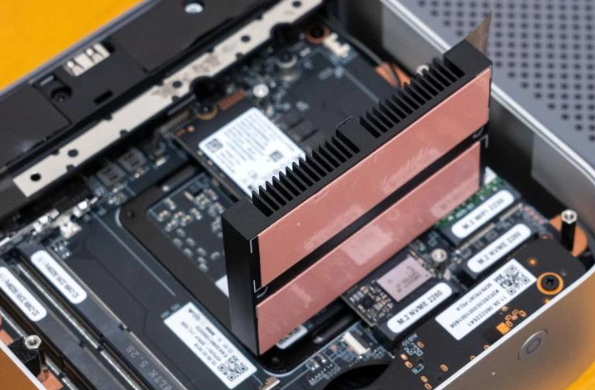
Bottom cover removal via four screws
A dense perforated dust filter
Two DDR5 SODIMM slots
Two PCIe 4.0 SSD slots (you noted “two PCIe4.0 slots” inside)
This is the kind of mini PC I’d actually recommend to non-enthusiasts because upgrades don’t look intimidating—and the dust filter is a very real quality-of-life feature for pet households.
The “cost” you must accept
I’m buying into an iGPU-first system—gaming is good for 1080p low/medium, not a desktop GPU replacement.
The real “killer feature” (10GbE NAS workflow) assumes you also pay for NAS + SSD pool + 10GbE switching/transceivers.
Comparison & buying advice (vs similarly priced mini PCs)
How it compares in its price bracket (CNY 2,299–4,599 as provided)
In this segment, many mini PCs offer fast iGPUs and USB4, but built-in 10GbE is still uncommon and often requires adapters. If your workflow involves a NAS, that single port can change the whole experience: you stop “copying files around” and start editing in place.
On the other hand, if you don’t need 10GbE, you can often get similar day-to-day performance from machines with 2.5GbE for less—especially if you’re okay with fewer creator-focused optimizations.
Three-tier recommendation
Buy now: if you’re building a NAS-based photo/video workflow and want quiet sustained performance plus native 10GbE at these prices.
Wait for a discount: if you like the idea but don’t yet have a 10GbE network; you might not realize the main benefit until the rest of the setup exists.
Switch to a competitor: if your priority is heavier Premiere workloads or higher gaming settings—consider a mini PC with stronger CPU tiers, or a system with eGPU/desktop GPU options.
wrap-up
I see the Beelink SER9 MAX as a mini PC designed around a real creator problem: fast, practical access to growing media libraries via 10GbE + NAS. The benchmark results, sustained thermals, and measured noise levels suggest it can stay fast without becoming annoying on a desk. Just be clear about the tradeoff: it’s excellent for photo work and light editing, but it won’t replace a desktop GPU.


